How I Automated My Own Multilingual Docs with Localizeflow

Updated: 2/24/2026 · 6 min read
Maintaining two languages manually was killing my focus. Here's how I automated Localizeflow's own docs using Localizeflow.
The Problem: Translation Wasn’t Hard. Sync Was.
Over the past three months, I’ve been running both documentation and blog content in Korean and English.
My workflow was simple:
- Draft in Korean.
- Create the English version.
- Maintain both over time.
At the beginning, it felt manageable.
In many cases, I could just ask AI to update the other language, and it worked surprisingly well.
For a while, that felt efficient.
But once the docs started evolving faster — new features, updated screenshots, API changes — things quietly started to break down.
Whenever I updated the English version, I had to:
- Remember that Korean also needed updating.
- Manually find what changed.
- Double-check I didn’t miss anything.
At first, I kept both versions tightly in sync.
But at some point, I noticed something uncomfortable:
I was updating the English docs immediately…
and telling myself I would “update Korean later.”
Later rarely came.
The translation itself wasn’t the hard part.
Keeping two languages in sync was.
And as a founder, my focus shouldn’t be on chasing outdated paragraphs across languages.
At some point I realized something slightly ironic:
I was building a localization automation product and manually maintaining my own multilingual docs.
That didn’t make sense.
So I decided to dogfood Localizeflow on Localizeflow’s own docs and blog.
The Decision: Automate or Drop a Language
There were only two realistic options:
- Stop maintaining Korean.
- Or automate the workflow.
Dropping a language felt wrong.
But continuing manually felt inefficient.
If multilingual documentation requires discipline and constant attention,
it won’t survive in a fast-moving startup.
So instead of removing a language,
I decided to remove the friction.
I installed Localizeflow on our documentation repository.
No YAML.
No extra configuration.
Just GitHub App installation.
That was it.
I didn’t want another dashboard.
I didn’t want another translation portal.
I wanted my existing GitHub workflow to stay intact.
And it did.
If you’re curious about the exact integration flow, you can check the setup guide:
https://docs.localizeflow.com/
Before diving deeper, a quick note on the stack.
We use Astro as our static site generator.
Astro doesn’t provide strongly opinionated multilingual support out of the box — at least not in the way some documentation frameworks do.
That was intentional.
I wanted to test Localizeflow in a less “helpful” environment first.
If it works cleanly with Astro, it should work even more smoothly with Hugo, Docusaurus, or Mintlify — which offer stronger i18n primitives.
Now, onto what actually changed.
What Setup Actually Looked Like
After installing the GitHub App during sign-up, I connected my documentation repository by clicking the “Connect repositories” button.
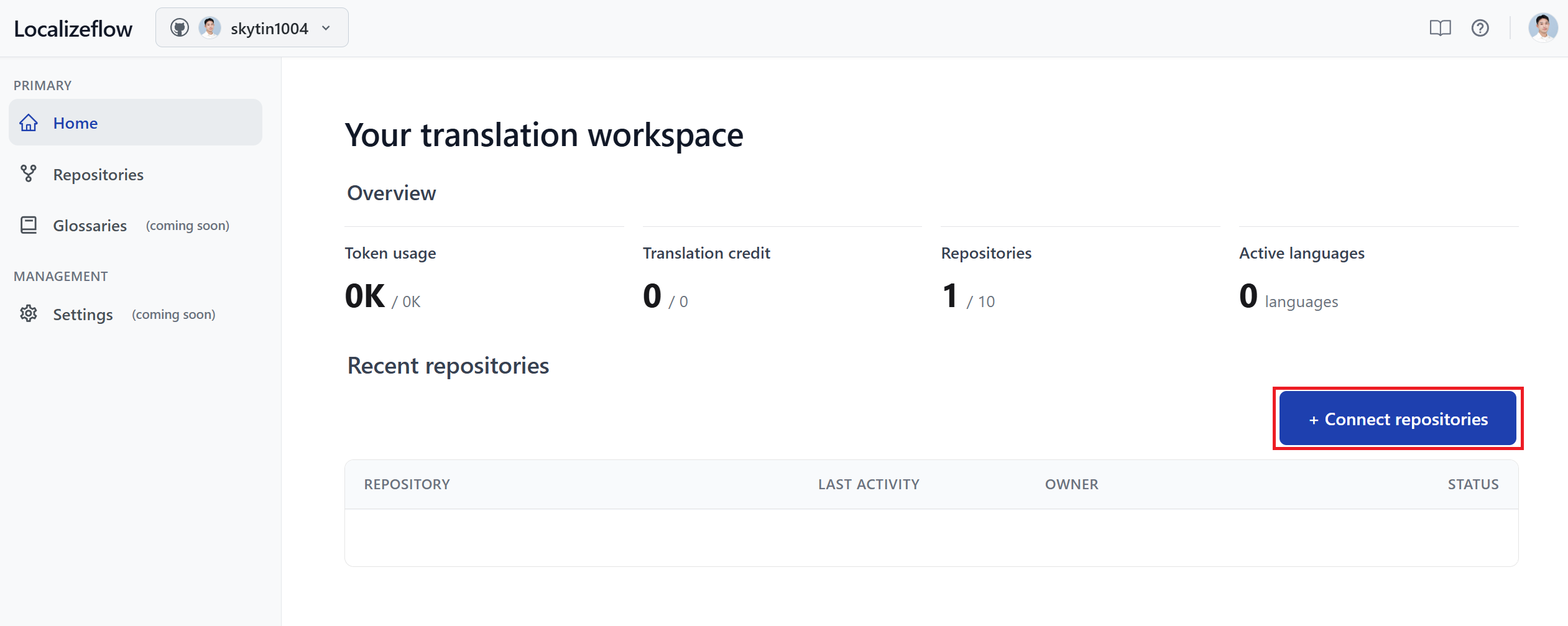
Once connected, clicking the repository brings you into the onboarding flow.
Instead of a long configuration process, it came down to three decisions:
- Languages
- Output structure
- Glossary rules
The entire process took a few minutes.
What stood out to me wasn’t just the speed, but the fact that I didn’t have to modify infrastructure.
I wasn’t adding CI scripts.
I wasn’t restructuring folders.
I was mostly confirming how my repository already worked.
That felt important.
Because in my experience, “automation” tools often require system changes.
This one didn’t.
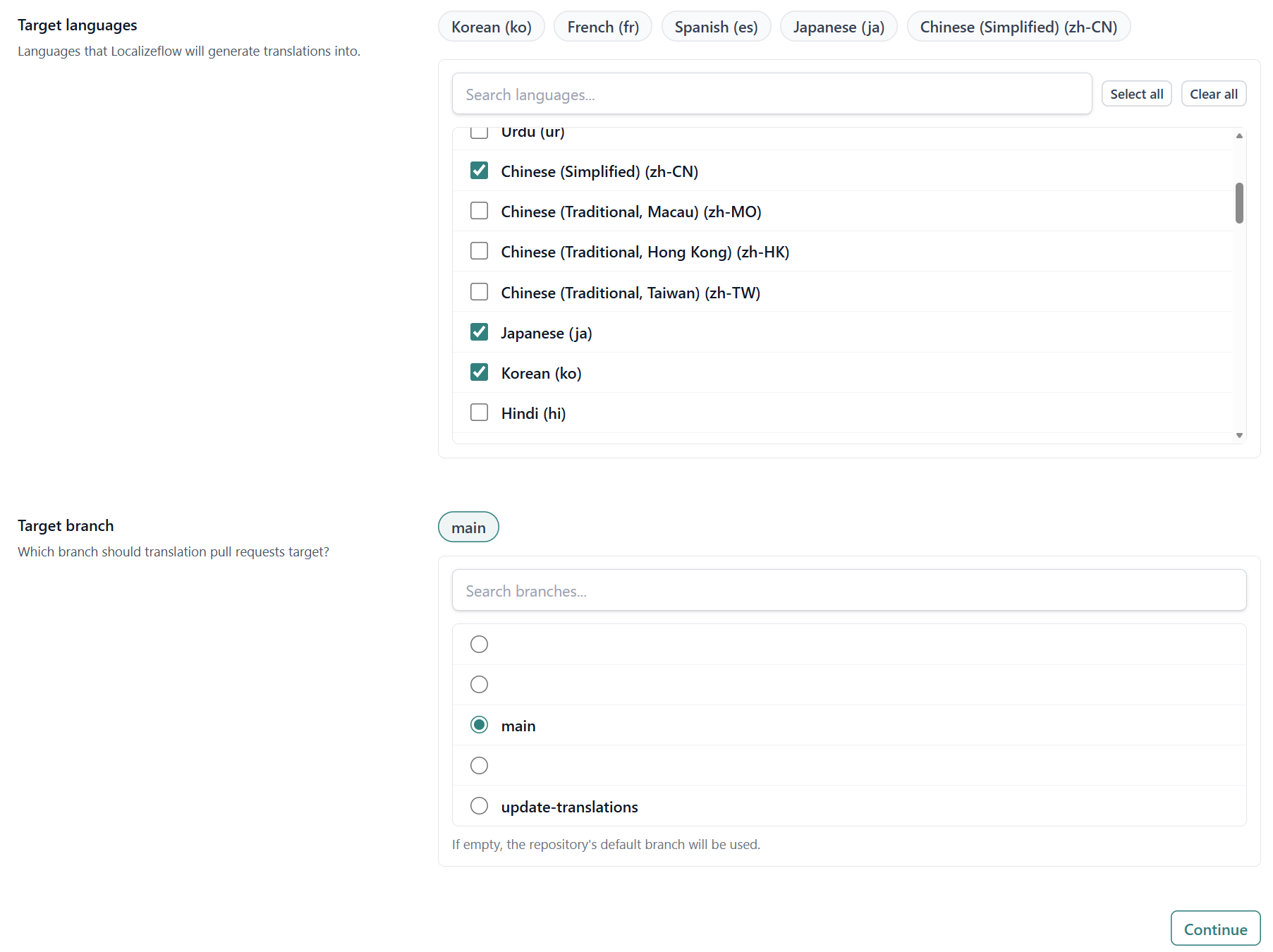
1. Selecting Target Languages
The first decision was selecting target languages.
Each language becomes its own translation Pull Request stream. That design choice makes changes visible, not hidden.
It fits naturally into a GitHub workflow.
2. Defining Where Translations Live
For output paths, I used the repository analysis feature.
It scanned the repository and suggested source and target paths.
I reviewed the suggestion and confirmed it.
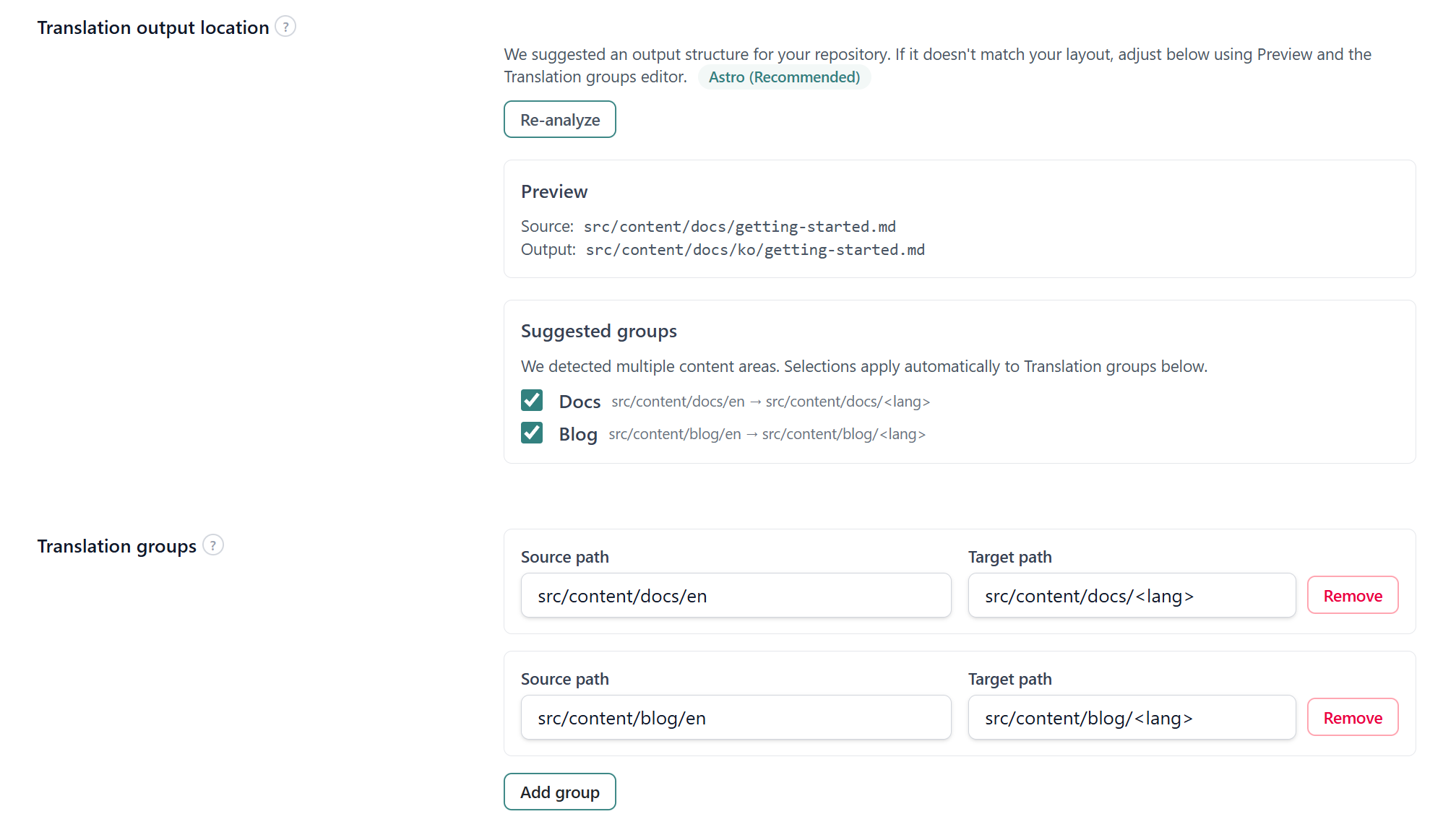
Before continuing, I checked the preview of how the folder structure would look after translations were generated.
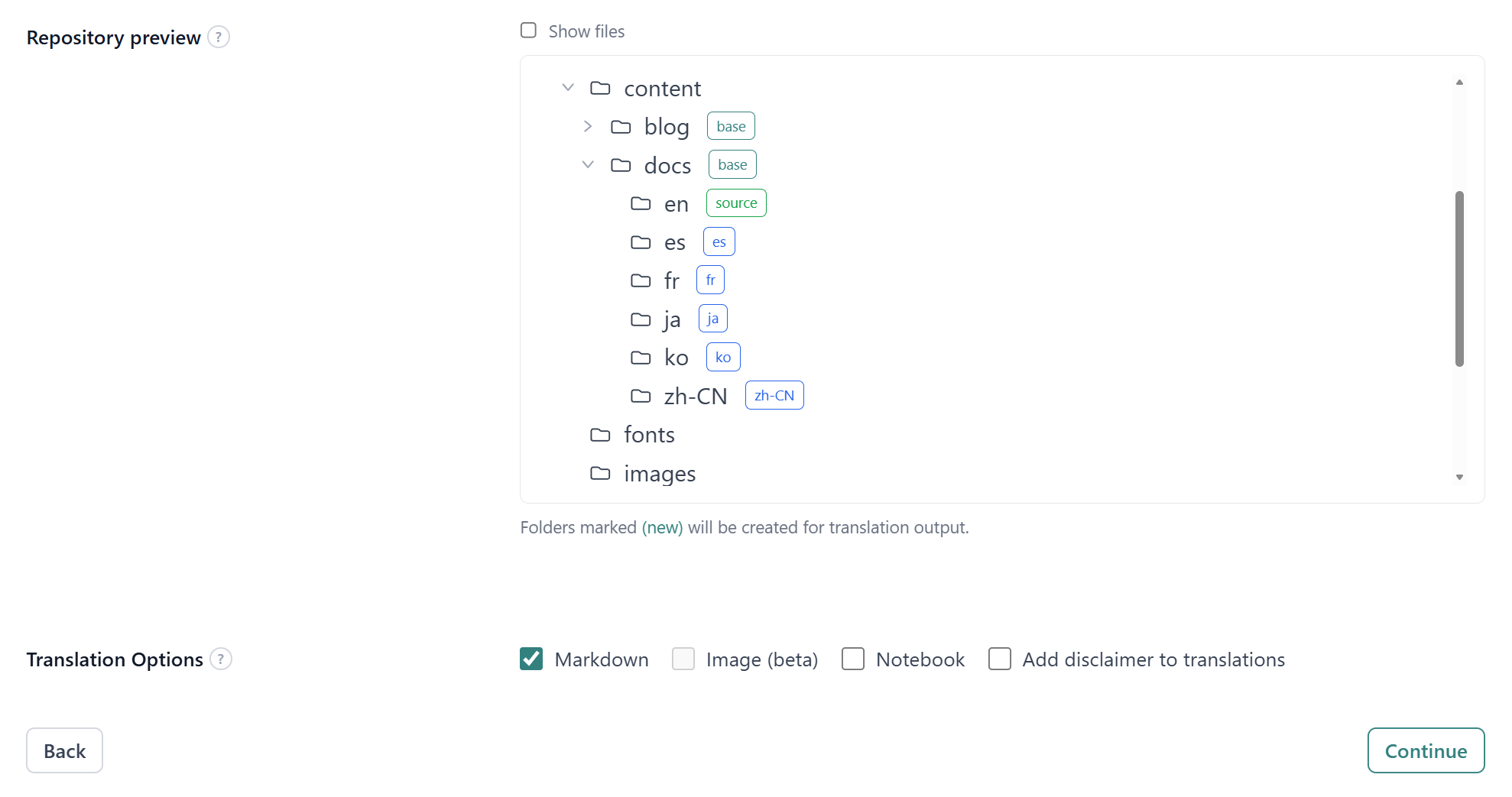
That preview mattered.
It showed exactly where translated files would live, without modifying anything yet.
I didn’t have to manually reason about folder mappings from scratch.
I simply validated what the system inferred from the existing structure.
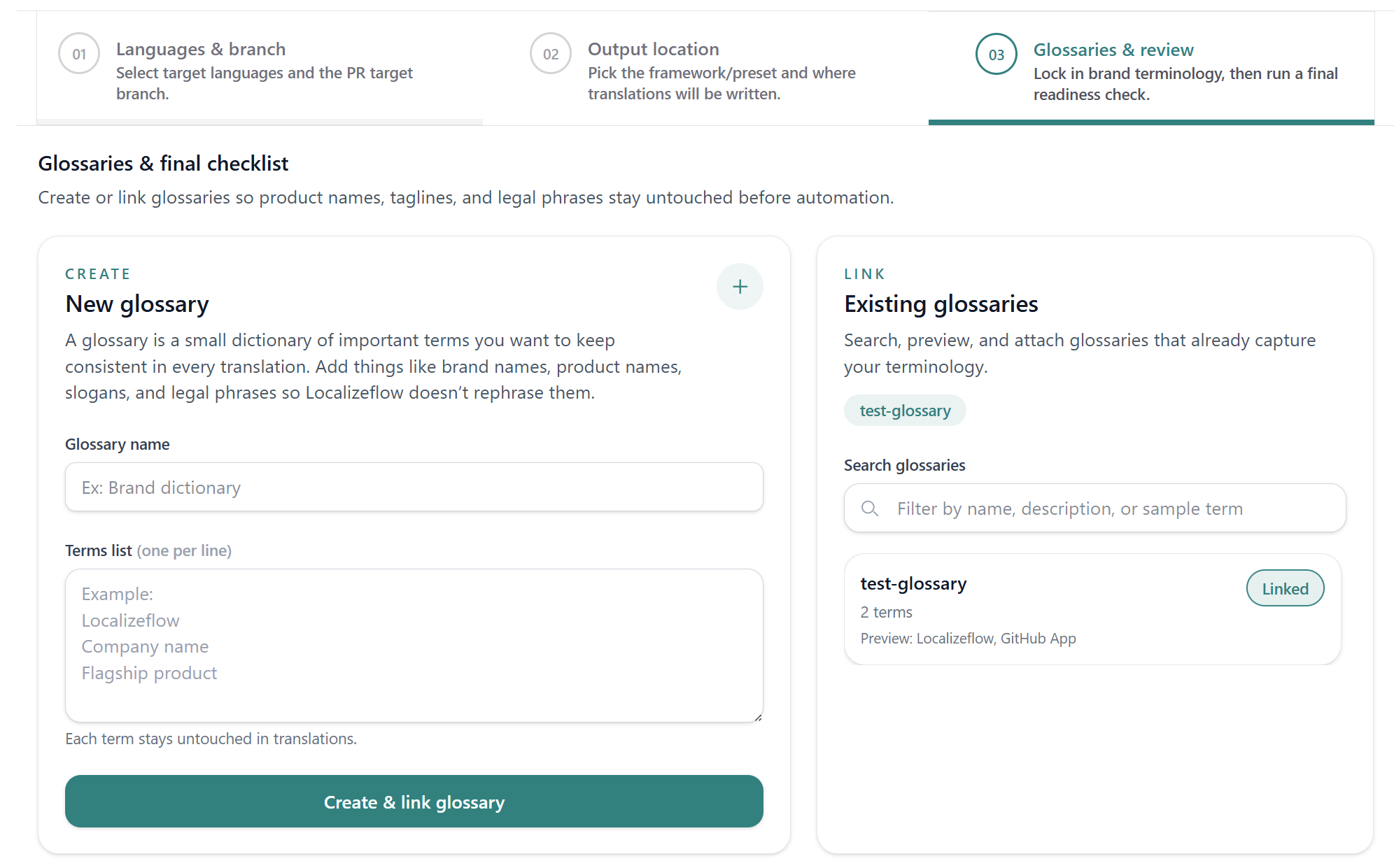
3. Glossary Rules
Before finishing setup, I added a small glossary.
Terms like:
- Localizeflow
- GitHub App
- Co-op Translator
remain unchanged in translations.
That saves repetitive PR corrections later.
Total Setup Time
Under five minutes.
But more importantly:
No CI reconfiguration. No new pipelines. No folder migrations.
Setup didn’t feel like adopting a new system.
It felt like enabling a capability inside the existing one.
What Happens When I Edit English Now
Here’s what changed in practice.
Before:
- Edit English doc.
- Open Korean doc manually.
- Search for changed sections.
- Update.
- Commit both.
Now:
- I update the English Markdown file.
- Localizeflow detects content changes via hash comparison.
- A translation Pull Request is automatically generated.
- I review and merge.
That’s it.
I no longer “do translation.” I review a PR.
And that psychological difference is huge.
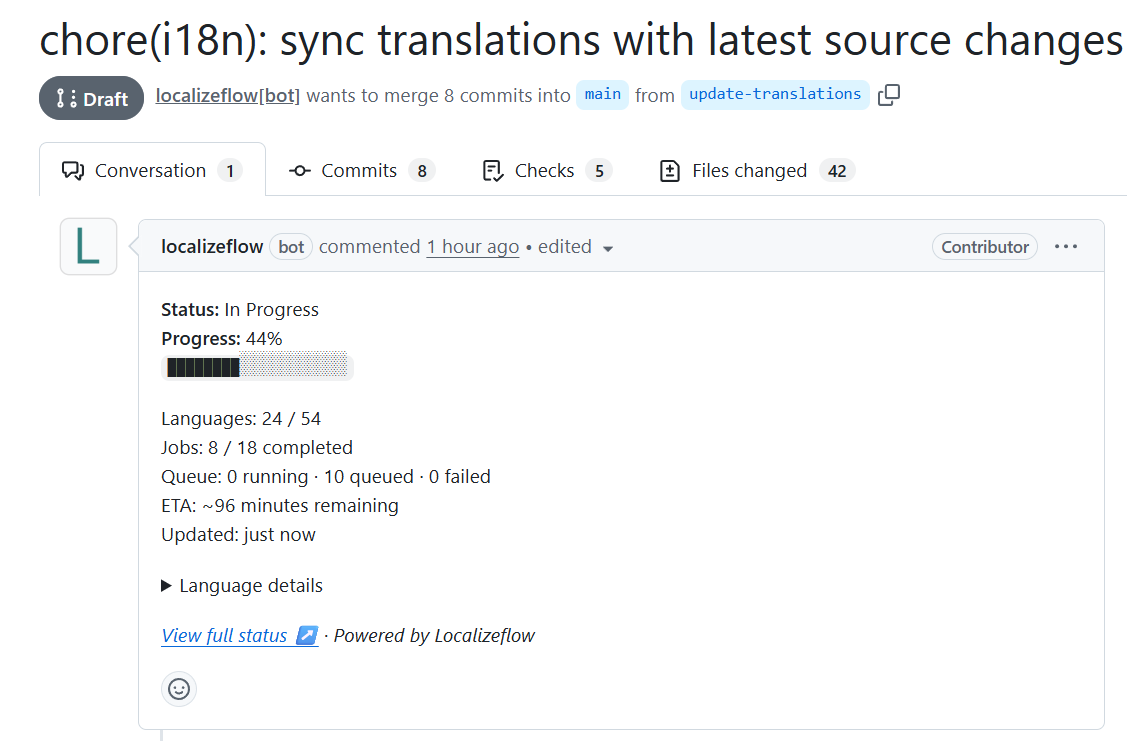
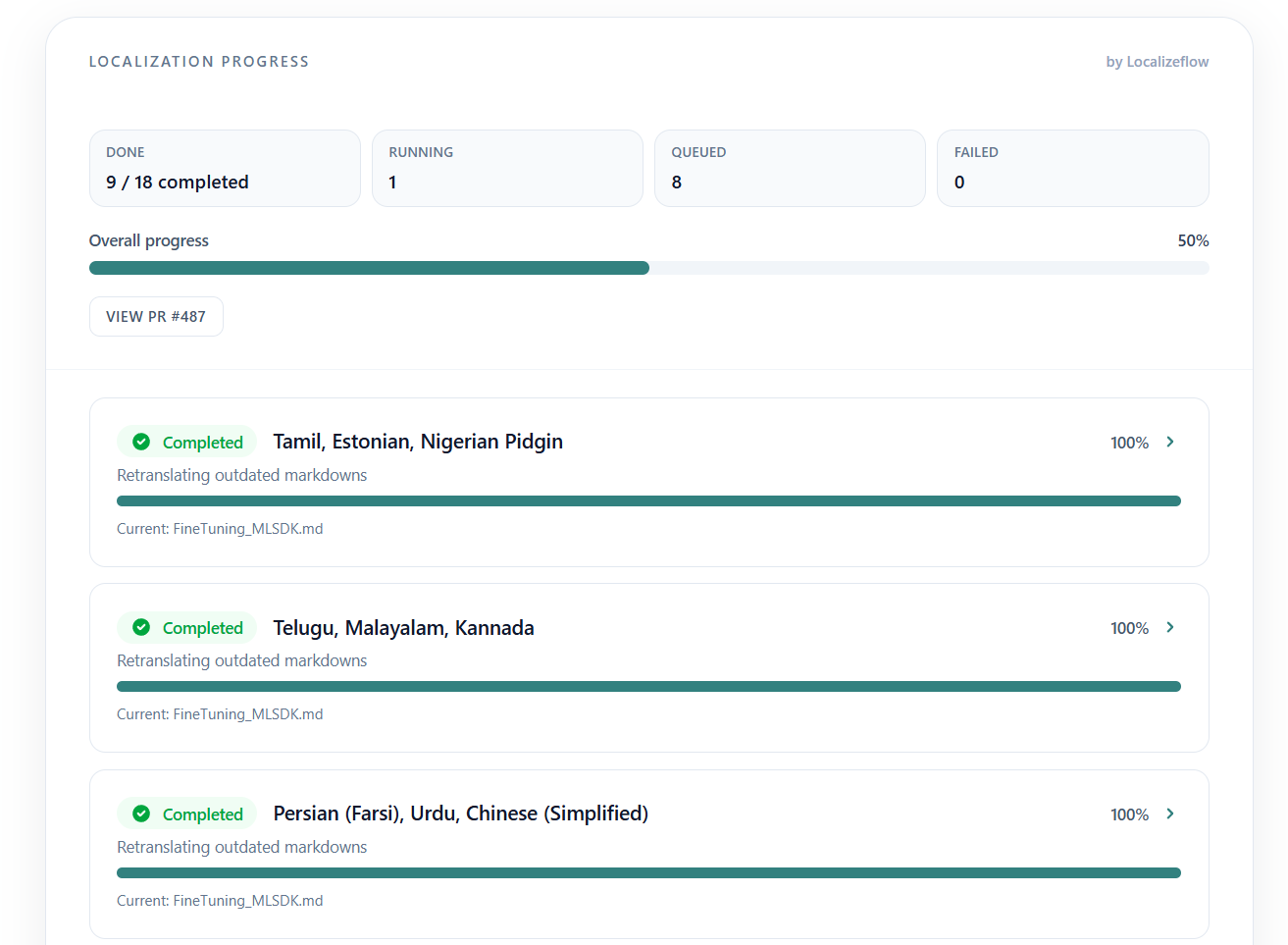
After setup, the Localizeflow dashboard isn’t something I actively monitor.
Job progress is posted directly in the Pull Request as structured status updates.
If you open the PR, you immediately see:
- Current progress
- Completed languages
- Remaining jobs
- Any failures
It behaves more like a CI status than a separate translation tool.
That design makes it feel native to GitHub.
What Actually Improved
1. I Think in One Language Now
I only update the English source.
I no longer ask: “Did I update Korean too?”
That cognitive load is gone.
2. Changes Don’t Pile Up
Previously, small updates would accumulate because updating both languages felt annoying.
Now, even tiny doc edits feel cheap.
Which means documentation quality improves indirectly.
3. It Stays in My Workflow
Everything happens through Pull Requests.
No separate dashboard. Just review and merge.
4. Update Time Dropped to Minutes
Previously, even a small documentation change meant touching two files.
Now, updating a page takes the same time regardless of how many languages we support.
The marginal cost of adding a language is effectively zero.
What Still Needs Work
Dogfooding also exposed a few limitations:
-
With Astro, after translations are generated, I still needed to manually adjust certain URLs to correctly reference localized routes. This may not be an issue with static site generators that provide stronger built-in i18n routing.
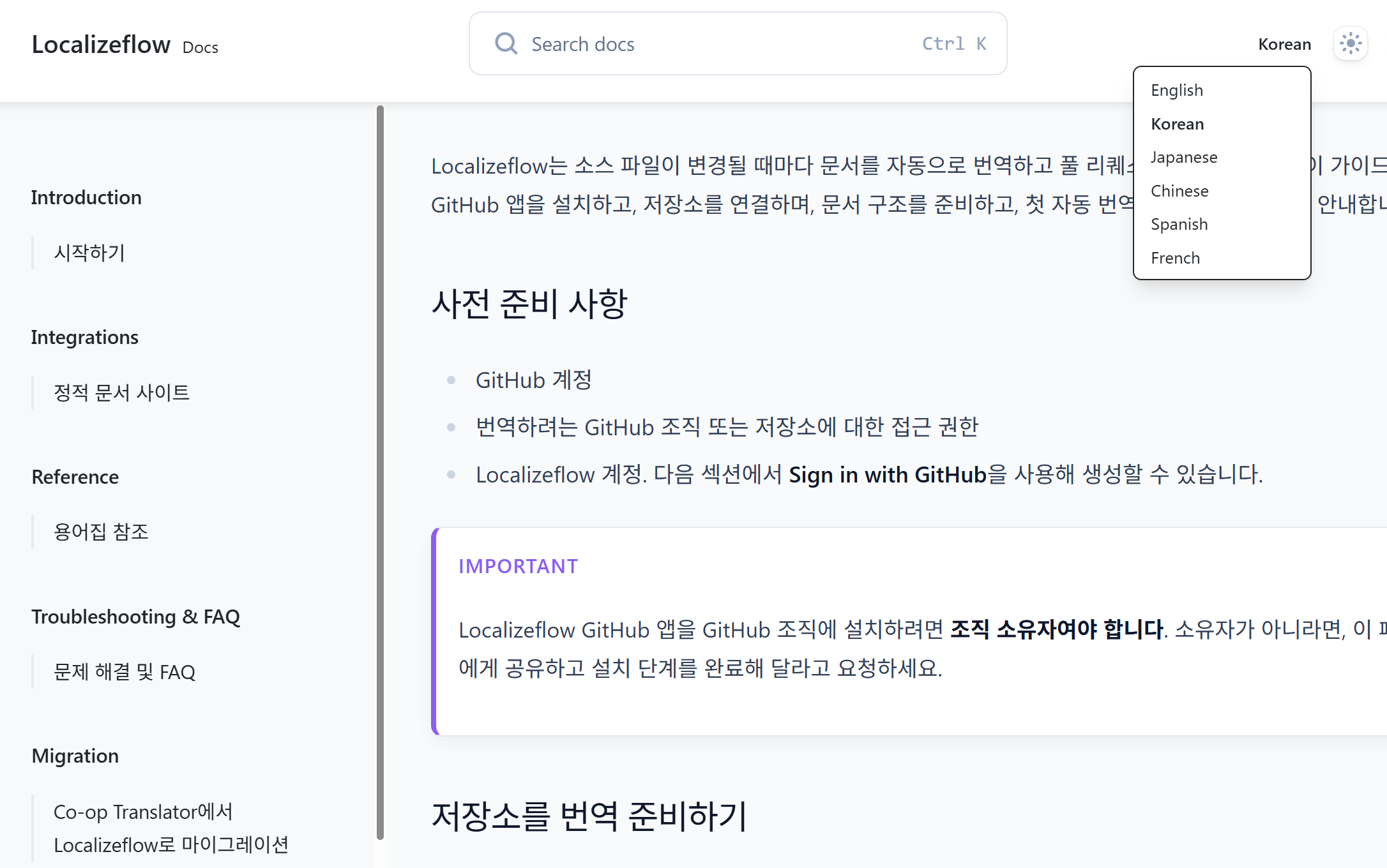
-
I implemented a simple language switcher in the header to make navigation between localized pages easier.
Even with these small manual steps, the overall maintenance effort is dramatically reduced.
The Real Outcome
Before:
Maintaining two languages felt like overhead.
Now:
Maintaining multiple languages feels sustainable.
And that changes the strategic equation.
When localization stops being painful, global reach becomes a default — not a burden.
Final Reflection
This wasn’t about proving the product works.
It was about proving the workflow works under real founder pressure.
When you’re building features, talking to users, handling ops — documentation is the first thing to slip.
If multilingual docs require discipline, they won’t survive.
If they require only reviewing a PR, they might.
Dogfooding Localizeflow made one thing clear:
Translation is easy.
Synchronization is the real problem.
And synchronization can be automated.
Who This Is For
This workflow might resonate with you if you:
- Maintain multilingual READMEs
- Run a fast-moving OSS project
- Manage MDX-heavy documentation
- Frequently update examples, screenshots, or API references
- Or simply forget to update translations after changing the source
If multilingual documentation feels sustainable only when things are slow, it probably won’t survive when your project starts moving faster.
Automation doesn’t remove responsibility. It removes friction.
And in fast-moving environments, removing friction is often what makes consistency possible.
If you’re maintaining multilingual docs and want to see how this would look in your repository, I’m happy to walk through a live example.